A birthday countdown widget has two separate jobs: decide which event belongs on the screen, and show the right number of days when the app is no longer open. Sharing a date model solves part of that problem. Each operating system still needs its own storage, rendering, and update path.
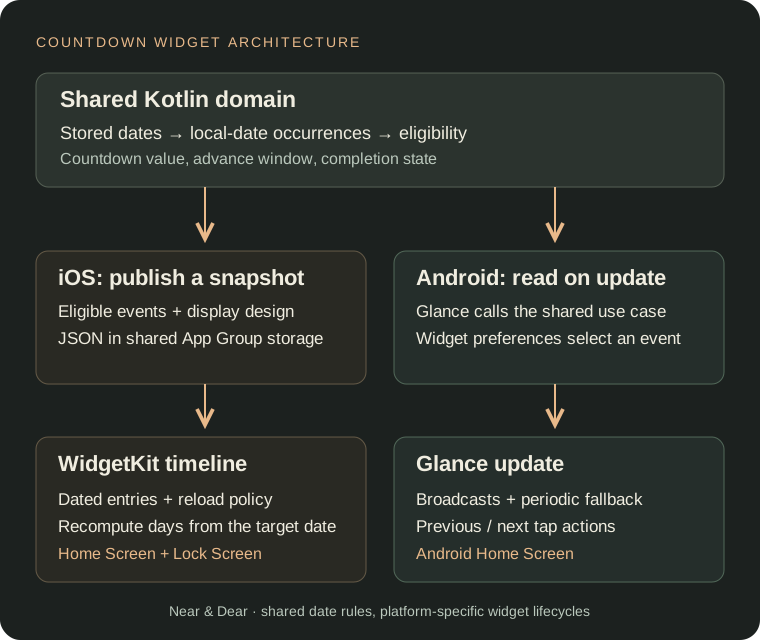
Near & Dear uses Kotlin Multiplatform for its event rules, WidgetKit for iPhone widgets, and Jetpack Glance for Android Home Screen widgets. This article follows the current implementation from a saved date to a native widget, including advance windows, calendar-day arithmetic, and the difference between refreshing a countdown and refreshing its event list.
Calculate calendar days before rendering the widget
For a birthday on September 25, a user reading the widget on September 24 expects “1 day.” That is a calendar-date calculation. Dividing a duration by 86,400 seconds can give a different answer around daylight-saving changes or when the current time is late in the day.
Near & Dear’s GetOccurrencesUseCase converts the current instant to a local date in the device’s system time zone. The event’s recurrence rule resolves an occurrence date, and daysUntil produces the countdown. These are the relevant expressions, condensed from the use case:
val today = Instant.fromEpochMilliseconds(nowEpochMilliseconds())
    .toLocalDateTime(TimeZone.currentSystemDefault())
    .date

val nextDate = day.nextOccurrence(today)
val daysLeft = today.daysUntil(nextDate)
The resulting SpecialDayOccurrence carries the event, its occurrence date, and daysLeft. Renderers receive a resolved occurrence instead of independently deciding what a birthday or yearly anniversary means.
Model the advance window as an eligibility rule
A date can be saved long before it belongs on the Home Screen. Each event has an advanceDays value that defines how early its countdown becomes eligible.
The current domain rule also keeps unfinished, overdue occurrences eligible:
val isEligible: Boolean
    get() = (!isCompleted && isDelayed) ||
        daysLeft in 0..specialDay.advanceDays
For a 30-day window, an occurrence 31 days away is excluded; at 30 days it enters the window, and at zero it is still eligible. A negative count remains eligible when that occurrence has not been completed.
Completion is handled separately from the window. The use case removes completed occurrences once their date has passed. Completing an event early or on the day does not immediately remove it from the current list.
That separation gives both platforms the same input rules, while leaving native widgets free to apply their own instance settings, such as selecting one event or hiding delayed occurrences.
Bridge Kotlin data into the iOS widget extension
On iOS, the shared Home view model filters eligible occurrences, applies widget priority ordering, and resolves each event’s design. It publishes a WidgetData payload containing WidgetSnapshot records.
Each snapshot includes the event ID, title, occurrence date, cached countdown, footer text, and design keys. The following excerpt shows only the date and identity fields:
@Serializable
data class WidgetSnapshot(
    val id: String,
    val daysLeft: Int,
    val nextDate: String,
    val title: String,
    // Display labels and design fields omitted.
)
IosWidgetPublisher serializes the full payload as UTF-8 JSON and writes it to App Group NSUserDefaults, under nearAndDear.events. An empty payload removes the stored value. The Swift widget reads those bytes and decodes them into its own payload types.
The publication and reload steps are separate. Kotlin writes the data; the Swift app requests WidgetCenter timeline reloads, including when the app moves into the background. Writing shared storage alone does not ask WidgetKit to render a new entry.
Several Swift payload fields are optional so snapshots from earlier app versions can still decode. For example, an older payload without nextDate falls back to its stored daysLeft value. That preserves compatibility, although the old payload cannot gain date-based recalculation until it is republished.
Recompute the countdown from the entry date
Saving only daysLeft = 17 would leave the extension with a number that ages immediately. Near & Dear also saves the ISO occurrence date, allowing the widget to derive a new count when it renders a later timeline entry.
After parsing that target date, SpecialDayEvent.daysLeft(at:calendar:) uses day boundaries:
let today = calendar.startOfDay(for: date)
let targetDay = calendar.startOfDay(for: target)
return calendar.dateComponents(
    [.day], from: today, to: targetDay
).day ?? daysLeft
This keeps a known event’s countdown independent of the last number calculated by the foreground app. The rendering date matters: a future timeline entry needs the count for that entry’s date, not the time when the timeline was constructed.
There is a separate freshness boundary. The current iOS payload contains events that were eligible when the app published it. Recalculating daysLeft cannot introduce an event missing from that payload when its advance window opens later. That requires a newly published event list. A design that needs the extension to handle future eligibility on its own would need to provide future events and enough rule data to evaluate them there.
Schedule iOS rotation with WidgetKit timelines
With multiple events and automatic rotation enabled, SpecialDayProvider creates eight entries spaced 15 minutes apart. Each entry advances currentIndex. It requests another timeline after two hours, or at the next local midnight if that comes sooner. With zero or one event, or automatic rotation disabled, it supplies one entry and requests a refresh after midnight.
The featured event uses a wrapped index:
let index = ((currentIndex % events.count)
    + events.count) % events.count
return events[index]
The empty-list guard runs before this calculation. The second modulo keeps a negative index valid when the user cycles backward. Wrapping also protects against an index left over from a longer event list.
These entries describe a schedule for the system. They do not run a permanent timer inside the widget. WidgetKit controls reload scheduling and applies a reload budget, so a requested policy is not an exact execution guarantee. Apple explains that lifecycle in Keeping a widget up to date.
Read shared occurrences when Android Glance updates
Android takes a different route. AndroidWidgetPublisher is a no-op because the Glance widget can call the shared use case directly when provideGlance runs:
val all = runCatching {
    getOccurrencesUseCase().first()
}.getOrDefault(emptyList())
val eligible = all.filter { it.isEligible }
This is a read during an update, not a permanent subscription. A date change still needs to trigger a new widget update so the use case calculates a new local “today.”
The current Android implementation combines date/time/time-zone broadcasts with a WorkManager fallback scheduled every six hours with a one-hour flex window. The worker updates installed Glance widget instances and retries if refreshing fails. The receiver schedules the fallback when widgets are enabled or updated, and cancels it when the last widget is disabled.
Android also stores a current index in widget preferences. Tapping the left or right portion cycles through eligible events; the center opens the app. This path is distinct from the automatic 15-minute timeline rotation implemented on iOS.
Glance renders through the app-widget system, and updates must be explicitly delivered to the host. Its application state and per-widget state also have different responsibilities. Android’s Glance state and update guide describes those boundaries.
Keep native widget surfaces explicit
The iOS widget declares Home Screen small and medium families plus inline, circular, and rectangular Lock Screen families. The same entry data feeds different native compositions. A circular accessory needs a compact title and count; a wider Home Screen layout has room for category, date, and visual decoration.
Near & Dear’s Android implementation described here targets Home Screen widgets. Sharing occurrence logic does not make the iOS Lock Screen compositions portable to an Android widget host.
Test time, list changes, and old payloads separately
Useful regression cases for this architecture include:
- The day before an advance window opens, its first day, and the event date itself.
- An overdue event before and after completion.
- A daylight-saving transition and a device time-zone change.
- An empty list, a single event, and backward navigation from index zero.
- Deleting an event while a widget stores an index from the previous list.
- Decoding a legacy iOS snapshot without an occurrence date.
- An event whose countdown is fresh but whose eligibility requires a newer snapshot.
These are distinct failure modes. Correct calendar arithmetic cannot compensate for a missing event, and correct event selection cannot compensate for a stale render. Keeping domain rules, persisted widget data, and native update scheduling separate makes each behavior easier to inspect.
Explore the Near & Dear widget builder, compare the iPhone and Android features, or read about another shared-code boundary in cross-platform haptics with Kotlin Multiplatform.