The usual shortcut for removing metadata from a photo on Android is to decode it into a Bitmap and compress it again. The new file has no EXIF block because Bitmap.compress never writes one. It also has a second round of lossy compression, a different file size, and possibly a sideways image.
Security Sentinel takes a different route. Its cleanup step treats the photo as a container, not as pixels. For JPEG, it rewrites the list of marker segments and copies the compressed scan data byte for byte. For HEIC, it overwrites the metadata items in place without moving a single byte of the file. In both cases the image's EXIF orientation survives.
This article walks through both implementations, the orientation exception, and the boundaries the code deliberately documents instead of hiding.
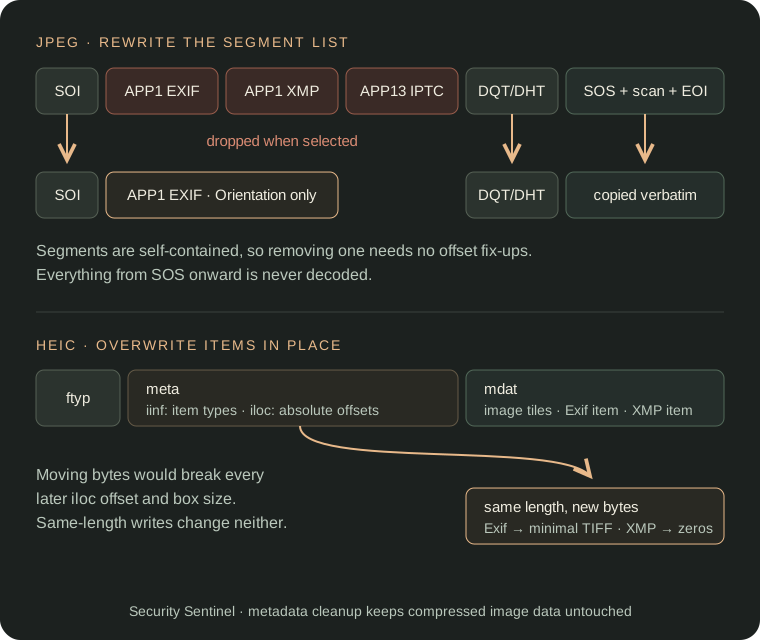
Why not decode and re-encode?
Re-encoding does remove metadata, but it changes more than the user asked for:
- Quality loss. JPEG is lossy. Every decode-and-compress cycle adds artifacts, even at quality 95.
- Orientation. Phone cameras usually store pixels in sensor orientation and record the rotation in the EXIF
Orientationtag. Drop the tag without rotating the pixels, and many viewers show the photo sideways. - Format changes. Android can decode HEIC on recent versions, but
Bitmap.compresswrites JPEG, PNG, or WebP. A cleaned iPhone photo would quietly become a different file type. - No proof. After a re-encode, there's no simple way to check that only the metadata changed.
A container rewrite avoids all four. The compressed image data is never decoded, so a test can compare it byte for byte.
Walk the JPEG marker segments
A JPEG file is a sequence of segments. Each one starts with 0xFF, then a marker byte, then a two-byte big-endian length that includes the length field itself. Metadata lives in application segments near the start of the file:
| Segment | Signature at payload start | Contents |
|---|---|---|
APP1 (0xE1) | Exif\0\0 | TIFF block: camera, timestamps, GPS, embedded thumbnail |
APP1 (0xE1) | http://ns.adobe.com/xap/1.0/\0 | XMP packet: editing history, creator tools |
APP13 (0xED) | Photoshop 3.0\0 | IPTC: caption, byline, keywords |
Two APP1 segments can sit next to each other, so the marker alone isn't enough. The signature decides what a segment contains.
The parser stops at SOS (Start of Scan). After that marker comes entropy-coded image data, and a standard JPEG doesn't put application segments there. It also skips standalone markers (SOI, EOI, RST0–RST7) that have no length field, and tolerates the 0xFF fill bytes that may precede a marker:
internal data class JpegSegment(
    val marker: Int,
    val markerStart: Int,
    val payloadStart: Int,
    val payloadEnd: Int,
)

// Inside listJpegSegments, for each marker before SOS:
val segmentLength = readUInt16BE(jpegBytes, lengthOffset)
val payloadStart = lengthOffset + 2
val payloadEnd = lengthOffset + segmentLength
if (segmentLength < 2 || payloadEnd > jpegBytes.size) return segments

segments += JpegSegment(marker, offset, payloadStart, payloadEnd)
offset = payloadEnd
A malformed length ends the walk and returns the segments read so far instead of throwing. The function returns null only when the file doesn't start with SOI. The segment list is a plain Kotlin function over a ByteArray, with no Android dependency, so it runs in ordinary JVM unit tests.
Rewrite the segment list, then copy the tail
With the offsets known, cleaning is a filtered copy. Keep SOI, keep each segment that wasn't selected for removal, then copy everything from the end of the last segment to the end of the file:
val output = ByteArrayOutputStream()
output.write(jpegBytes, 0, 2) // SOI
if (orientation != null) output.write(buildMinimalOrientationExifSegment(orientation))

var tailStart = 2
for (segment in segments) {
    val drop = when {
        removeExif && segment.marker == MARKER_APP1 &&
            isExifApp1Payload(jpegBytes, segment.payloadStart, segment.payloadEnd) -> true
        removeXmp && segment.marker == MARKER_APP1 &&
            isXmpApp1Payload(jpegBytes, segment.payloadStart, segment.payloadEnd) -> true
        removeIptc && segment.marker == MARKER_APP13 &&
            isPhotoshopApp13Payload(jpegBytes, segment.payloadStart, segment.payloadEnd) -> true
        else -> false
    }
    if (!drop) output.write(jpegBytes, segment.markerStart, segment.payloadEnd - segment.markerStart)
    tailStart = segment.payloadEnd
}
output.write(jpegBytes, tailStart, jpegBytes.size - tailStart)
JPEG segments are self-contained. Removing one doesn't invalidate offsets anywhere else, so the rewrite needs no fix-ups. Quantization tables, Huffman tables, the frame header, ICC profiles, and the scan data all pass through untouched.
Removing the EXIF segment also removes the EXIF thumbnail, which lives in the same TIFF block (IFD1). That matters for privacy: an app can crop or edit the main image and leave the old thumbnail unchanged. Security Sentinel's scan compares an 8×8 average luminance hash of the thumbnail with that of the main image, and flags the photo when they differ noticeably.
Keep orientation with a minimal EXIF segment
Removing all of EXIF would also remove tag 0x0112, Orientation. That's the one field a user almost never wants gone, so the cleaner reads it first and writes a replacement EXIF segment with nothing else in it.
Reading the tag needs only enough TIFF parsing to find IFD0. Check the byte order (II little-endian or MM big-endian), follow the IFD0 offset, and scan its 12-byte entries for tag 0x0112 of type SHORT. The replacement is the smallest valid TIFF block with one entry:
internal fun buildMinimalIfd0Tiff(orientation: Int?): ByteArray {
    val output = java.io.ByteArrayOutputStream()
    output.write(byteArrayOf(0x49, 0x49, 0x2A, 0x00)) // "II", magic 42
    output.write(u32le(8))                             // IFD0 starts at byte 8
    if (orientation != null) {
        output.write(u16le(1))                         // one entry
        output.write(u16le(TAG_ORIENTATION))
        output.write(u16le(TIFF_TYPE_SHORT))
        output.write(u32le(1))                         // count
        output.write(u16le(orientation))               // value, inline
        output.write(u16le(0))                         // padding
    } else {
        output.write(u16le(0))
    }
    output.write(u32le(0))                             // no next IFD
    return output.toByteArray()
}
For JPEG, that block is wrapped in FF E1, a length, and the Exif\0\0 signature, then placed right after SOI. If the original had no orientation tag, no EXIF segment is written at all. There's no reason to add an empty one.
HEIC: same-length overwrite instead of removal
HEIC photos, the default on iPhones, use the ISO base media file format (ISOBMFF). A HEIC file is a tree of boxes, not a list of segments. Metadata is stored as items:
meta/iinflists each item's ID and type. EXIF has typeExif; XMP is amimeitem with content typeapplication/rdf+xml.meta/ilocrecords where each item's bytes live, as absolute file offsets or offsets into anidatbox.
Absolute offsets change the strategy. Deleting the EXIF bytes would shift everything after them, including the image tiles in mdat. Every later iloc entry, and the sizes of the enclosing boxes, would then need recalculating. That's a lot of risk for saving a few kilobytes.
Security Sentinel keeps the byte count constant instead. It finds each metadata item's extents through iloc and overwrites them in place:
val replacement = if (itemTypeById[itemId] == "Exif") {
    buildBlankedExifItemPayload(heicBytes, start, len)
} else {
    ByteArray(len) // XMP: zeros read as "nothing found"
}
System.arraycopy(replacement, 0, output, start, len)
A HEIC Exif item begins with a four-byte exif_tiff_header_offset, followed by the same TIFF format that JPEG uses. The replacement payload sets that offset to zero, writes the minimal orientation-only TIFF from the previous section, and pads the rest with zeros up to the original length. No offset or box size in the file changes, and mdat is copied bit for bit.
HEIC also stores rotation in an irot item property, separate from EXIF. Keeping the EXIF tag is an extra safeguard for readers that check EXIF, not the only source of orientation.
The cleaner handles iloc construction methods 0 (file offset) and 1 (offset into idat). Method 2, item offset, is very rare for metadata items. The code leaves such items untouched rather than guess and risk corrupting the file.
Write a new file and leave the original alone
The Android side is a thin wrapper around those pure functions. ImageMetadataCleanupAction reads the original through ContentResolver, picks a cleaner from the file signature (a ftyp box at byte 4 means HEIC), and writes the result to a new file in the app cache:
val originalBytes = context.contentResolver.openInputStream(material.uri)
    ?.use { it.readBytes() }
    ?: error("Could not open the original image for cleaning.")

val cleanedBytes = when {
    isHeicContainer(originalBytes) -> cleanHeicContainer(originalBytes, removeExif, removeXmp)
    else -> cleanJpegContainer(originalBytes, removeExif, removeXmp, removeIptc)
}
The original Uri is never opened for writing. The copy keeps the original extension, because some apps choose a decoder by extension rather than content. It also gets a _clean suffix, so IMG_0412.heic becomes IMG_0412_clean.heic. The user reviews the result and decides whether to save or share it.
Only metadata findings drive the cleanup. A combined scan report can also contain face detection, OCR, and thumbnail findings. Those are filtered out, so the "removed" list never includes something like "No Faces Detected."
Test the bytes that must not change
Because the cleaners are pure functions over byte arrays, the tests work with hand-built fixtures and exact comparisons. The JPEG suite includes these cases:
- Removing the EXIF segment when there's no orientation tag, without synthesizing an empty one.
- Keeping orientation while dropping the rest of EXIF.
- Removing XMP or IPTC alone, leaving the other segments untouched.
- Cleaning with nothing selected returns byte-identical output.
- Scan data is byte-identical after every metadata segment is removed.
The HEIC suite checks that removing EXIF and XMP keeps the image item and the file size unchanged, that EXIF and XMP can be removed independently, and that non-HEIC input throws instead of producing a corrupt copy.
The last JPEG case is the one that justifies the whole approach. It holds only because the cleaner never decodes the image.
Known boundaries
A container-level cleaner is precise about what it touches, so it should also be clear about what it doesn't:
- Granularity is per segment or item, not per field. Selecting any EXIF finding removes the entire EXIF block except orientation. Editing individual tags inside nested GPS and EXIF sub-IFDs would need a full TIFF writer.
- Only the listed metadata is targeted. Other application segments, such as ICC color profiles and multi-picture
APP2data, are copied. Extended XMP, which uses a different signature, is copied too. - Formats. Cleanup supports JPEG and HEIC/HEIF. Any other format produces an error rather than a silent partial result.
- Pixels aren't metadata. A street sign, a face, or a screen in the photo stays visible after cleanup. That's why the scan also runs face detection and on-device text recognition, as separate findings.
Metadata removal is one step in reviewing a file before you share it, not a guarantee of anonymity.
See what Security Sentinel checks on the product page, read its privacy policy, or look at another low-level Kotlin problem in procedural adventure level generation.