A Motion Photo looks like an ordinary JPEG or HEIC file. Open it in an image decoder and you get a still. Most of the file, though, can be a short MP4 video appended after the image data. A cleanup app that recompresses that file as a plain image keeps the still and silently throws the video away.
PixClear reviews a photo library one item at a time and can shrink an item into a smaller copy. Motion Photos needed their own path: detect them before any compression, play the motion without touching the original, and, when someone wants to save space, let them choose the one frame to keep. This article follows that path through the Android code and shows where iOS Live Photos join it.
Detect motion before deciding what "optimize" means
Detection runs before the optimize options are shown, because the answer changes the action. A normal photo offers compression presets. A photo with motion offers Choose frame instead.
MotionPhotoDetector reads two samples from the file: the first 256 KB and, for larger files, the last 256 KB. It decodes them as ISO-8859-1, which maps every byte to one character, so text markers can be found in binary data without a decoding error.
fun classifySamples(headText: String, tailText: String): MotionPhotoVariant = when {
    googleMarkers.any(headText::contains) ||
        headText.contains("http://ns.google.com/photos/1.0/camera/") ||
        headText.contains("http://ns.google.com/photos/1.0/container/") -> GOOGLE
    samsungMarkers.any { headText.contains(it) || tailText.contains(it) } -> SAMSUNG
    listOf(headText, tailText).any { sample ->
        sample.contains("ftyp") &&
            (sample.contains("mp42") || sample.contains("isom") ||
                sample.contains("mp4") || sample.contains("qt  "))
    } -> UNKNOWN_MOTION_CONTAINER
    else -> NONE
}
Google markers live in the XMP packet near the start of the file (GCamera:MotionPhoto, GCamera:MicroVideo, the camera and container namespaces). Samsung writes its own markers, including the SEF trailer, which sits at the end of the file. That is why the Samsung check also looks at the tail sample.
The third branch matters most. A file with an MP4 ftyp box but no known vendor markers is classified as UNKNOWN_MOTION_CONTAINER, not as a plain image. The shared detectMotionPhoto returns true for every result except NONE, so an unknown container is protected from ordinary image compression. PixClear tells the user this variant cannot be optimized safely, instead of guessing and flattening it. If the file cannot be opened at all, the detector also returns the unknown variant, so a read error never makes a motion file look like a safe still.
The unit tests cover exactly these edges: a small file that fits entirely in the head sample, a Samsung marker found only in the tail, an unknown appended MP4 that must not be flattened, and a plain JPEG that must not be misclassified.
Find where the video starts
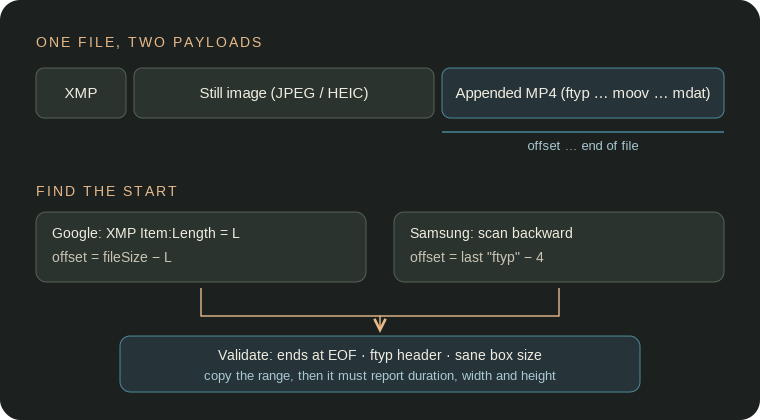
Detection only says what the file is. Playback needs the exact byte range of the video. The two vendors describe it differently.
Google: read the length from XMP
Google's Motion Photo format lists the file's parts in an XMP container directory. The video item has Item:Semantic="MotionPhoto" and an Item:Length. The video is the last item in the file, so its start is the file size minus that length.
googleVideoLength reads that value carefully:
val items = Regex("<[^>]+>").findAll(xmp).map { it.value }.filter {
    Regex("Item:Semantic\\s*=\\s*[\"']MotionPhoto[\"']").containsMatchIn(it)
}.toList()
if (items.isNotEmpty()) {
    if (items.size != 1) return null
    return itemLength.find(items.single())?.groupValues?.get(1)?.toLongOrNull()?.takeIf { it > 0 }
}
return legacyOffset.find(xmp)?.groupValues?.get(1)?.toLongOrNull()?.takeIf { it > 0 }
The length is read only from the element that declares the motion item, not from the first Item:Length anywhere in the packet, which could belong to the primary image. Two motion items is an ambiguous file, so the function returns null and PixClear does not play it. Older files use MicroVideoOffset, which counts bytes back from the end of the file and therefore works as the same length. A leftover motion flag with no offset or length is not enough to extract anything.
Samsung: search backward for the last ftyp
Samsung files do not carry an equivalent length that PixClear relies on, so it looks for the MP4 itself. Every MP4 starts with a box whose type is ftyp, preceded by a 4-byte size. PixClear scans backward from the end of the file in 2 MB windows, up to 128 MB, and takes the last ftyp it finds:
if (bytes[index] == 'f'.code.toByte() && bytes[index + 1] == 't'.code.toByte() &&
    bytes[index + 2] == 'y'.code.toByte() && bytes[index + 3] == 'p'.code.toByte()
) {
    newest = start + index - 4
    break
}
// ...
end = start + 7 // retain box-size and ftyp bytes across a chunk boundary
The search goes backward because the appended video is near the end, and the last match is the outermost video, not an ftyp string that happens to appear in image data earlier. Windows overlap by seven bytes, so a box header split across two windows is still found.
Validate the range before anyone plays it
A byte offset from a regex or a string search is a claim. Before copying anything, isPlausibleMp4 checks it against the file:
- The range must end exactly at the end of the file (
offset + length == total). - The first bytes at the offset must be a box of type
ftyp. - The declared box size must be at least 16 bytes and no larger than the range.
- The major brand must be printable ASCII.
Only then is the range copied into the app's cache with FileChannel.transferTo, which moves the bytes without loading the whole video into memory. The loop stops with an error if a copy makes no progress before the validated end.
The last check uses the platform's own parser. MediaMetadataRetriever opens the copied file, and it must report a positive duration, width and height. If it doesn't, the copy is deleted and the item is treated as unsupported.
The source is opened read-only from start to finish. PixClear never edits the Motion Photo; it reads a range out of it.
The cache is small on purpose. The copied file is named from a SHA-256 prefix of the content URI plus the video length, so returning to the same photo reuses the copy when its length still matches. Files older than 24 hours are removed before a new extraction.
Ask once per photo
The viewer, the action row and the optimize sheet all ask whether the same photo has motion, often within the same second, and again when the user pages back. On Android each answer is a file read; on iOS it is a PhotoKit fetch.
MotionPhotoCache in shared code keeps one answer per URI, up to 512 entries. A second caller that arrives while the first read is still running awaits the same Deferred, so two screens never read the file twice. Failures are not stored, so a temporary error is retried the next time instead of being remembered as "no motion".
Keep one exact frame
PixClear does not yet compress a Motion Photo while keeping its motion. The current option is honest about that: the user picks one frame, PixClear saves it as a still photo, and the original Motion Photo moves to Pending Deletions, where it can still be recovered.
The frame picker has to show real frames, and the frame that is saved has to be the frame that was on screen.
Offer every sample, not a guessed frame rate
The slider is built from the video's own sample list. MediaExtractor walks the video track and reads each sample's presentation time without decoding any pixels:
while (true) {
    val time = extractor.sampleTime
    if (time < 0) break
    times += time
    if (!extractor.advance()) break
}
A three-second clip at 30 fps gives about ninety positions, each one a frame that exists. Nothing is interpolated from duration and an assumed frame rate.
Two small offsets keep the ends usable. The last selectable time is 50 ms before the reported duration, so the last request always stays inside the video. And each step aims 2 ms past the start of its sample (FRAME_ENTRY_US). Rounding a timestamp can land a hair before a sample, which a zero-tolerance seek resolves to the previous frame; 2 ms is well inside even a 120 fps frame of about 8 ms.
The order of those two rules mattered. An earlier version added the 2 ms before checking the end limit, which pushed the final frames past it and dropped them. Those last moments of a capture are often the ones people want. MotionFrameTimes.selectable now filters on the sample's own start time and applies the offset afterwards, and a shared test keeps it that way.
Decode the closest frame, not the nearest keyframe
On Android, frames come from MediaMetadataRetriever.getFrameAtTime with OPTION_CLOSEST. The faster OPTION_CLOSEST_SYNC returns the nearest keyframe, which can be many frames away from the slider position. Preview and export both ask for the same microsecond, from the same extracted file, with the same option, so they resolve to the same sample.
Dragging the slider passes over many frames, so the picker waits 60 ms after the slider stops and decodes only the frame it rests on, plus one neighbour on each side for quick stepping. Frames far from the current position are dropped from memory.
The same picker on iPhone
The picker UI and the frame-time rules are shared Kotlin. Each platform implements four expect functions: detect motion, extract the video, list frame times, and decode a frame.
On iOS there is no byte parsing. A Live Photo is a PHAsset whose mediaSubtypes contains .photoLive, and the video is a separate PHAssetResource, preferably .fullSizePairedVideo, otherwise .pairedVideo.
Frame decoding uses AVAssetImageGenerator with zero tolerance before and after. Unlike Android's retriever, it reports the actualTime of the frame it produced, and PixClear saves that time rather than the requested one:
generator.requestedTimeToleranceBefore = .zero
generator.requestedTimeToleranceAfter = .zero
let result = try await generator.image(
    at: CMTime(seconds: seconds, preferredTimescale: 1_000_000))
let actual = result.actualTime
The timescale is one million so microseconds survive the conversion. The common 600 timescale rounds to steps of about 1.67 ms, a sixth of a 120 fps frame.
iOS also has a failure Android does not: the original may be in iCloud. The shared code separates two outcomes. null means "this item has no motion PixClear can read", and the picker falls back to the cover photo. An exception means "the video exists but can't be fetched right now", and the picker offers Retry. The native layer also re-checks PhotoKit before handing over an original for compression, so an outdated index cannot send a Live Photo down the plain-image path.
Regression cases worth keeping
- A plain JPEG, a Google file with one motion item, a Google file with two, and a legacy
MicroVideoOffsetfile. - A Samsung file whose only marker is at the end, and one whose
ftypheader crosses a 2 MB window boundary. - An appended MP4 from an unknown vendor, which must be protected, not compressed.
- A range that does not end at the end of the file, and a video the platform cannot play.
- The first and last frame of a clip, at 30, 60 and 120 fps.
- A Live Photo stored only in iCloud, with the network off and then on.
Each case covers a different step: classification, locating the range, validating it, or choosing a frame. Keeping those steps separate means a failure in one of them falls back to the cover photo, and the original file stays as it was.
See PixClear, or read how a related problem is solved without re-encoding in removing photo metadata on Android.