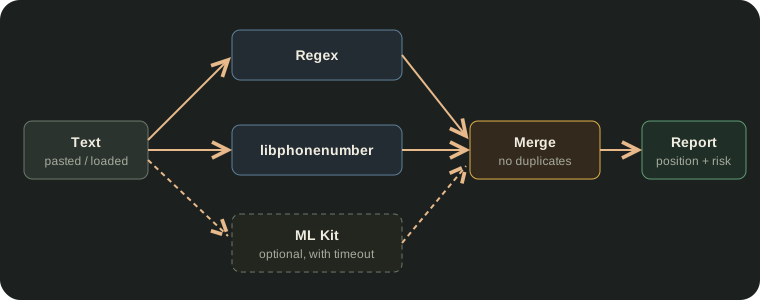
A log excerpt, a .env file or a copied email can contain a national ID number, a password or the address of an internal server. Security Sentinel checks the text with three different tools, merges the results without duplicates, and then replaces or removes exactly the parts you choose.
This article explains how each detector works, how their results are combined, and what the app can't detect. Security Sentinel is available on Google Play.
Text has no metadata, so the problem is the content
A PDF or a photo hides information around the content. Plain text has nowhere to hide anything: everything that matters is in the text itself. So the scan looks for patterns in the text and records the exact position of each match, from character X to character Y. The position is needed for two reasons: the report can highlight exactly that part, and the redaction can replace it without affecting the rest of the text.
The text can be typed, pasted from the clipboard, or loaded from a .txt or .json file. The scan runs locally, on the phone.
Three tools, each with its own strength
| Tool | What it finds well | Where it's weak | Available |
|---|---|---|---|
| Regular expressions (regex) | Email, IP, UUID, file paths, Romanian CNP, API keys, tokens | Can't recognize anything without a fixed format (addresses, names) | Always |
| libphonenumber (Google) | Phone numbers, validated against each country's real rules | A local number without + is assumed to be Romanian | Always |
| ML Kit Entity Extraction | Free-form postal addresses, IBAN, card, email, phone | Needs Google Play services and internet the first time the model is downloaded | Sometimes |
The first two always run, including in airplane mode. The third works on a best-effort basis: it has 5 seconds to download the model and 5 seconds to analyze. If it doesn't succeed, it returns null, not an empty list, and the difference matters. null means "tool unavailable", while an empty list means "nothing found". The report states explicitly that ML Kit didn't run, so it doesn't give the impression that the text is clean.
Regex: fixed patterns, chosen to avoid false alarms
Regex is fast and always gives the same result for the same text, but it matches any string that has the right shape, even when it doesn't have the right meaning. That's why most patterns come with an extra check.
CNP (Romanian national ID): shape and check digit
Any 13-digit string can look like a CNP. The app also checks the first digit (1–8) and the check digit, computed with the official weights:
val weights = intArrayOf(2, 7, 9, 1, 4, 6, 3, 5, 8, 2, 7, 9)
val remainder = (sum(digit[i] * weights[i]) for the first 12) % 11
val control = if (remainder == 10) 1 else remainder
// valid CNP only if the 13th digit == control
IP addresses: internal vs. public
An address from the local network (10.x, 172.16–31.x, 192.168.x, 127.x) is only useful from inside the same network and gets medium risk. A public address identifies a server reachable from the internet and gets high risk.
Internal servers
The app doesn't flag every "word.word" as a server name. It recognizes only two reliable forms: an explicit host:port (db.company.ro:5432), or a domain that can't exist publicly (.local, .internal, .corp, .lan, .intranet). An ordinary domain such as example.com in a sentence isn't flagged.
File paths
A path like D:\projects\report only reveals the folder structure (low risk). A path that contains a user name (C:\Users\ana\…, /home/ana/…) identifies a real account (high risk).
Keys and passwords
Every secret found gets high risk. The patterns rely on concrete evidence, not statistical guesses:
AKIA...                            // real AWS key prefix
ghp_... / xoxb-... / sk_live_...   // GitHub, Slack, payment keys
eyJ....eyJ....signature            // JWT: three dot-separated segments
postgres://user:password@db.host   // password inside a connection string
AWS_SECRET_ACCESS_KEY=...          // .env line with a "secret" variable name
api_key: a8f3k29dk20x...           // long value with letters + digits
For the last form, the value must be at least 12 characters long and contain both letters and digits. That way, password: secret in a sentence isn't flagged.
Phone numbers: validation, not just digits
A phone regex either catches any 10-digit string or works for a single country. libphonenumber analyzes every possible number and checks its length and prefixes against the rules of the country in question. Numbers written with +country_code are recognized for any country. Numbers without a prefix are treated as Romanian numbers (default region RO).
Merging: one finding, confirmed by several sources
The same phone number can be found by both libphonenumber and ML Kit. The app doesn't show it twice. When two results overlap in the text, they become a single finding that keeps both sources ("confirmed by 2 tools"). The label of the merged finding comes from the most reliable source:
libphonenumber (real validation) > regex (exact, no context) > ML Kit (statistical)The risk level follows a rule based on what was observed with real data. ML Kit sometimes identified an IP address as a phone number. If the maximum risk were simply taken, the high risk of the wrong interpretation ("Phone") would have replaced the medium risk of the correct label ("IPv4 Address"). The rule used is:
- If the sources agree on the category, they confirm each other and the higher risk is kept.
- If they have different categories, the losing source misread the text, so only the winning source's risk counts.
Category and risk: two separate axes
Every finding has a category (what kind of data it is) and a risk level (how serious the exposure is). The two don't depend on each other. For example, in the Contact category an email has high risk, while a postal address has medium risk.
| Category | Examples |
|---|---|
| Personal data | CNP, IBAN, payment card |
| Contact | email, phone, postal address |
| Technical identifiers | IP, UUID, server name, file paths, URL |
| Secrets | API keys, tokens, JWT, passwords in a connection string or .env |
Redaction: from the end to the beginning
On the redaction screen you choose the findings and the redaction mode:
Replace with label:  Call me at 0722 123 456  →  Call me at [PHONE]
Remove entirely:     Call me at 0722 123 456  →  Call me at
The positions of all findings are calculated on the original text. If the app replaced the first finding, all the ones after it would shift and their positions would no longer be correct. That's why redaction starts from the last finding and works back to the first, so a change never affects the findings still left to process:
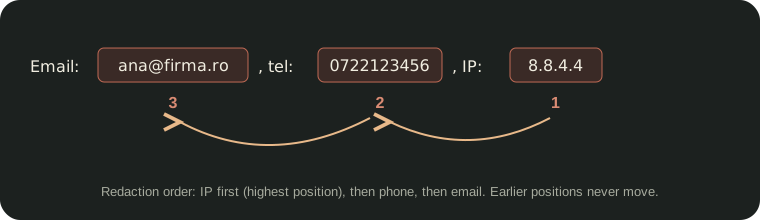
The result is saved to a new UTF-8 .txt file with the _clean suffix. The original text isn't modified.
Known limitations
- Personal names are not detected. None of the three tools can reliably recognize a name in free text.
- ML Kit uses the English-language model. Addresses written in Romanian may be recognized less often.
- IPv6 addresses are recognized only in their full form (8 groups), not in the short form with
::. - A foreign local phone number written without
+country_codemay not be detected. - API keys without a known prefix are found only when they follow a name such as
key,token,secretorpassword.
All processing runs locally, on the device.
Get Security Sentinel on Google Play, see what else it checks on the product page, or read how it cleans PDF and DOCX metadata and photo metadata.